I rented a pair of graphics cards for an afternoon to find out how many people one open model could serve at once. The number was fine. What set the number was not what I expected.
Ornith-1.5-35B-A3B · 2×A100 80GB SXM · vLLM 0.27.1 · August 2026
new open model came out and I wanted to know what it would cost to run. Not the benchmark scores. The boring operational question: if I put this behind a chat box, how many people can talk to it at once before it gets slow?
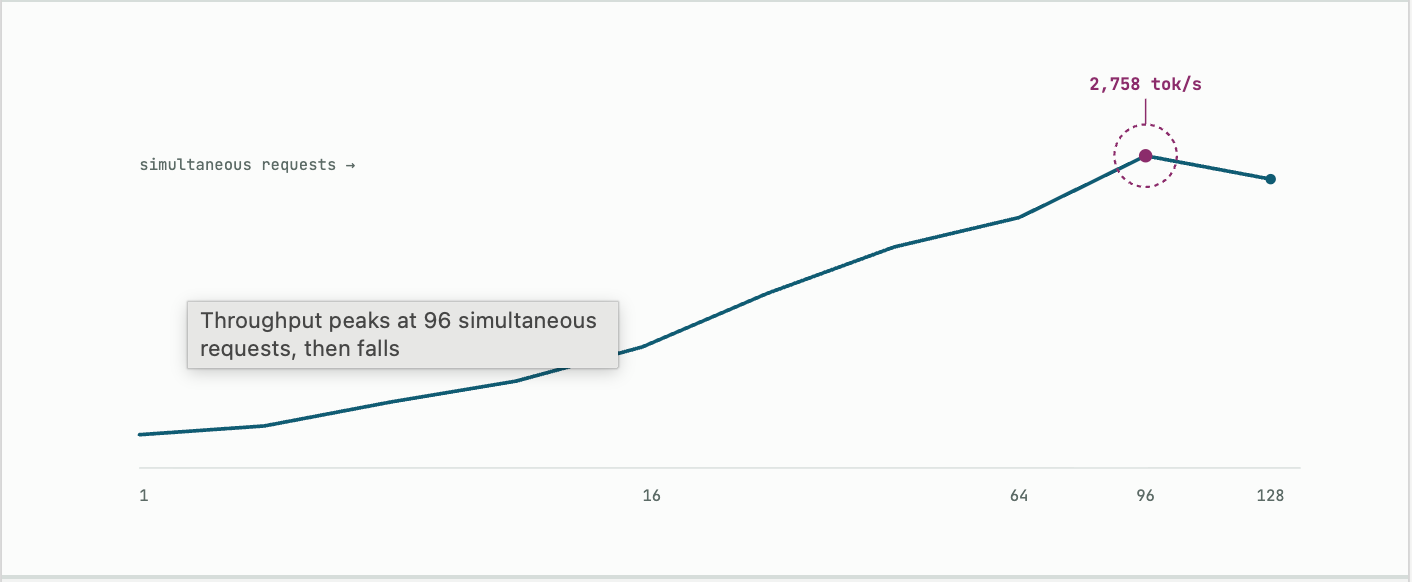
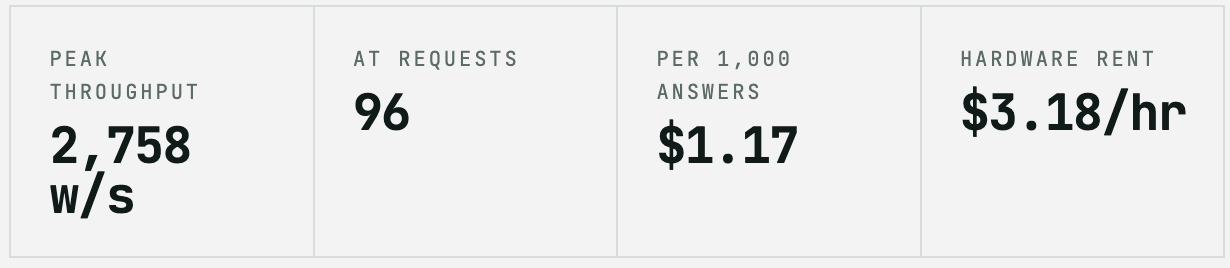
So I rented two A100 cards for $3.18 an hour and spent an afternoon measuring. The short answer is about 96 requests in flight, which works out to roughly 250 people in a normal chat product, at about $1.17 per thousand answers.
The longer answer is that I had the wrong mental model going in, and the machine corrected me three times.
01 The model thinks before it speaks
Ornith 1.5 is a mixture of experts. It holds 35 billion parameters but only runs about 3 billion of them for any given word. It picks 8 experts out of 256 each time. That means it needs a lot of memory and not much math, which is a good trade if you have the memory.
It is also a reasoning model. Before it answers you, it writes out its thinking. You can read that part or hide it, but you pay for it either way.
I asked it to say hello in five words. It used more than 128 words of thinking and never got to the greeting. When I gave it room, a small code question produced 3,146 words, then 3,851, then 3,938. Three runs, one prompt, and the answer itself was maybe a tenth of that.
Every request pays the thinking tax. A trivial question does not get a trivial answer.
Hold onto that. It turns out to be the whole story.
02 My first plan was wrong
I started out wanting one card, not two. The model publishes a quantized build that fits in 22 gigabytes, and one A100 has 80. That felt like plenty.
It was the wrong shape of plenty. The quantized files are built for llama.cpp, which is excellent at running a model for one person and mediocre at running it for a hundred. If I benchmarked that, I would learn how fast llama.cpp schedules work. I would learn nothing about the card.
The proper server is vLLM, and vLLM wants the full-precision weights. Those are 70 gigabytes. On an 80 gigabyte card that leaves nothing for the memory the model needs while it works. There are compressed formats that would fix this, but the ones that exist for this model need newer silicon than an A100 has.
So: two cards. Twice the rent, and a number that means something.
03 Renting the machine
Two A100s on RunPod’s secure cloud, $1.59 each per hour. Stock was thin, so I asked for any of the four datacentres that carry them and got one in Maryland.
id      fxq8raklh45kus
gpus    2 x NVIDIA A100-SXM4-80GB
cost    $3.18/hr
disk    60 GB container + 250 GB volume
Loading the weights took ten minutes. Compiling took another five. Then vLLM printed the line that changed how I thought about the rest of the day:
GPU KV cache size: 3,230,234 tokens
Maximum concurrency for 32,768 tokens per request: 98.58x
Ninety-eight users, each with a full 32,000-word context, and that was before any tuning. I had expected memory to be the wall. Most of this model’s layers do not keep a growing memory of the conversation the way a normal transformer does, so the running cost per user is tiny.
Memory was never going to be the problem. I just did not know that yet.
04 Two instructive bugs
My test script reported that every single request produced zero words. Meanwhile the server log showed 700 words per second flowing out and every request returning a clean success.
I guessed wrong first. I blamed the tool-calling parser, which was a reasonable guess and completely incorrect. The real cause was smaller and dumber: this version of vLLM sends the thinking text in a field called reasoning. My script was looking for reasoning_content, which is what the older version called it. Every word arrived and my script threw all of them away.
The second bug was mine from the start. When a request produced nothing, my script counted it as a success and then crashed trying to print statistics about it. It had no way to notice its own failure.
Both bugs shared a shape. A benchmark that cannot tell the difference between working and broken will report confident numbers about nothing. Before trusting a measurement, check that it can fail loudly.
05 What the numbers said
The test sends a fixed prompt to many simultaneous callers and records three things: how long until the first word arrives, how fast words arrive after that, and how many words per second come out of the machine in total.
I ran it twice. Once with a bare 60-word prompt, and once with a realistic 1,500 words of system prompt and conversation history, because that is what actual traffic looks like.
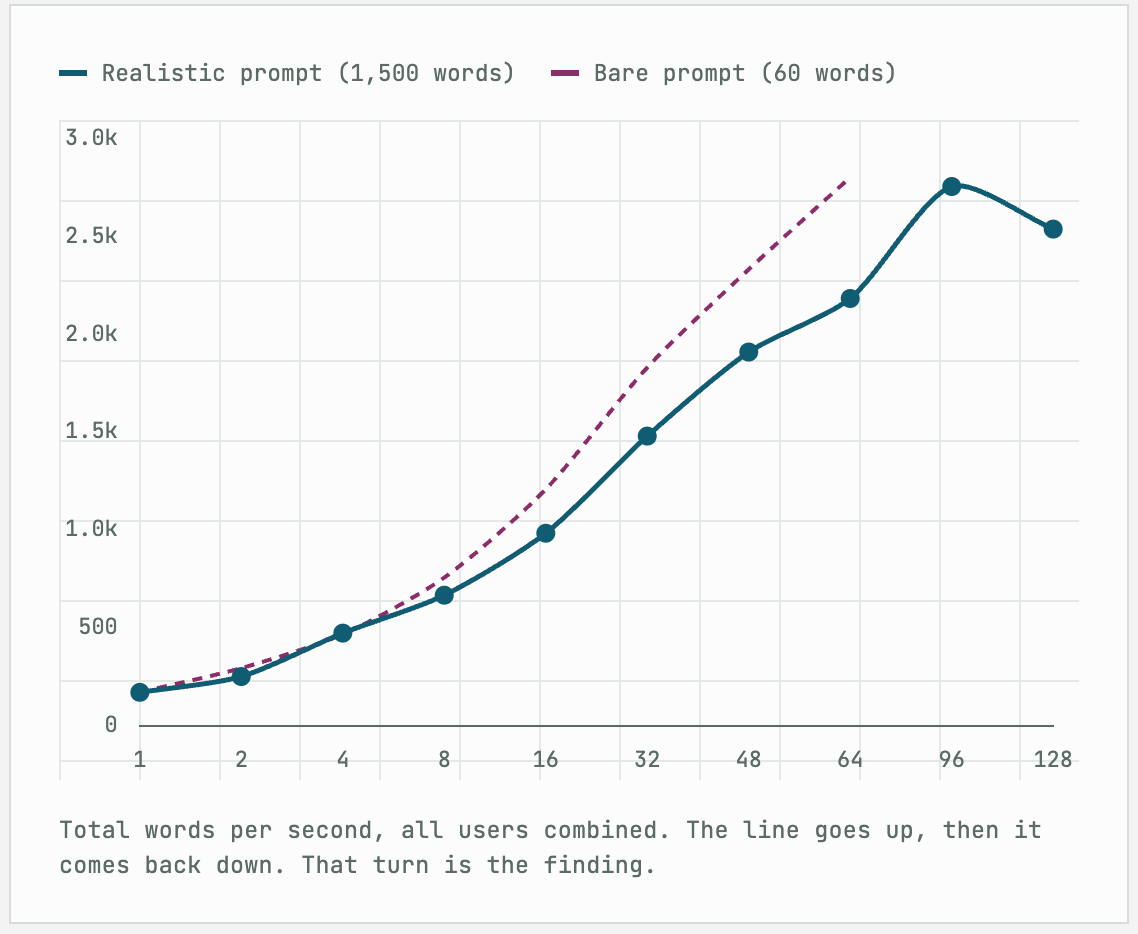
Throughput climbed all the way to 96 simultaneous requests, hit 2,758 words per second, and then got worse. At 128 requests the machine produced fewer words than at 96, despite doing more work.
That is not a queue backing up. I had removed the request limit entirely. The machine genuinely slows down when you ask it to do more.
06 The experts are the wall
Here is why. The model picks 8 experts out of 256 for each word. One user at a time, that is cheap: you touch 8 of the 256 and skip the rest.
But every user picks a different 8. With 96 users running at once, the machine is making around 768 expert choices per step across a pool of 256. Every expert is awake on every step. The model stops behaving like a 3 billion parameter model and starts behaving like the 35 billion parameter model it actually is.
Past that point, another user does not buy you parallelism. It just buys you work.
This is the ceiling of the architecture on this hardware. It is not a bug and there is no flag to fix it.
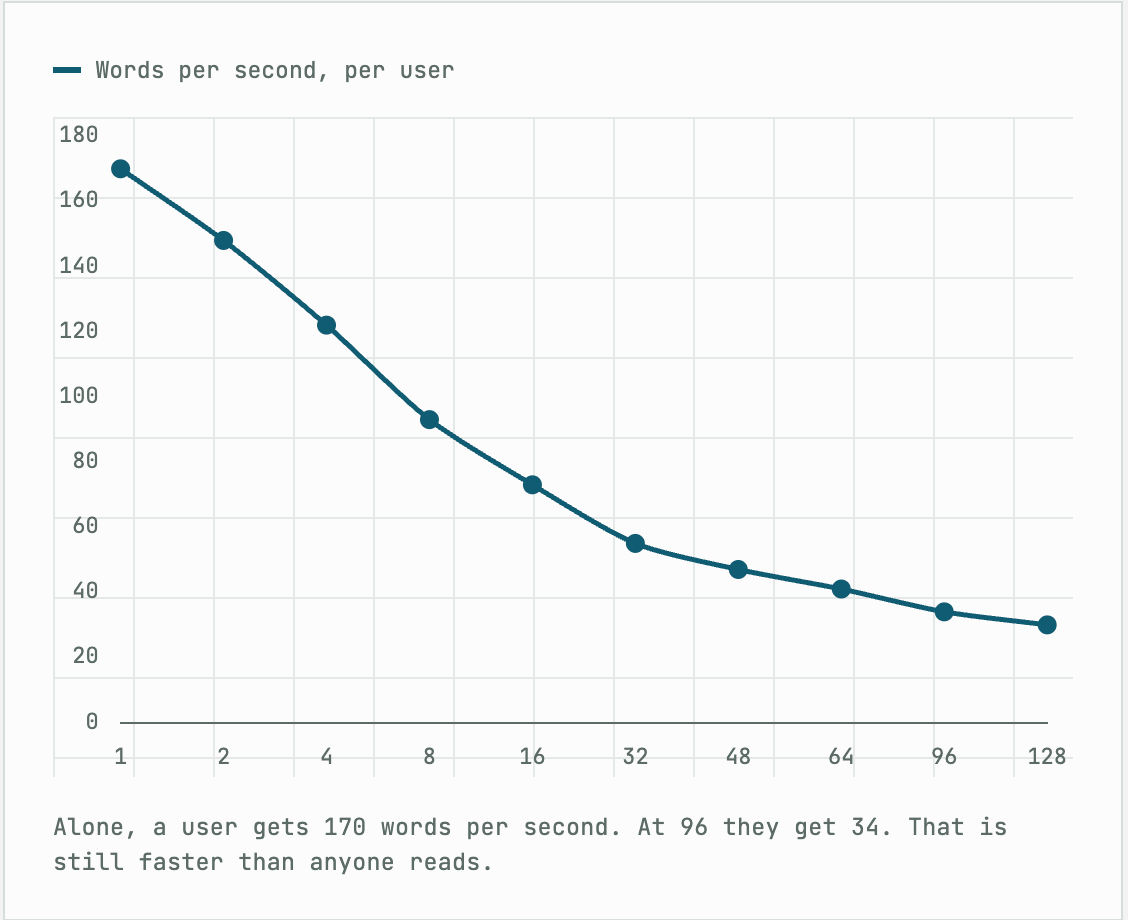
Meanwhile the speed each individual user sees falls the whole way down.
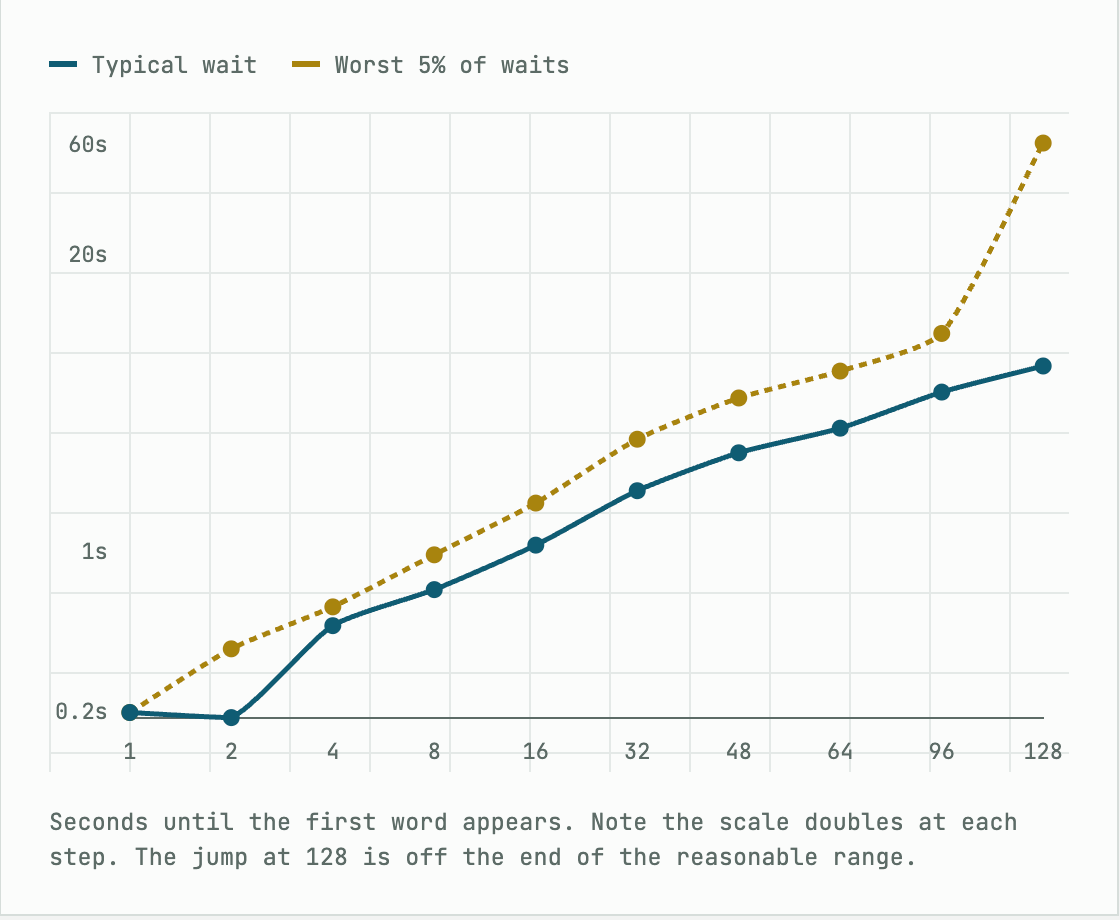
Waiting time follows the same curve until it doesn’t. From one user to 96, the wait for the first word grows from a fifth of a second to five seconds. Predictable, gradual, fine.
At 128 the worst-case wait jumps to 62 seconds while the typical wait stays at seven. That gap is the sound of the machine falling over.
07 What it costs
Words per second is an engineer’s number. Money per answer is everyone else’s. A typical answer runs about 3,645 words, so I can convert one into the other.
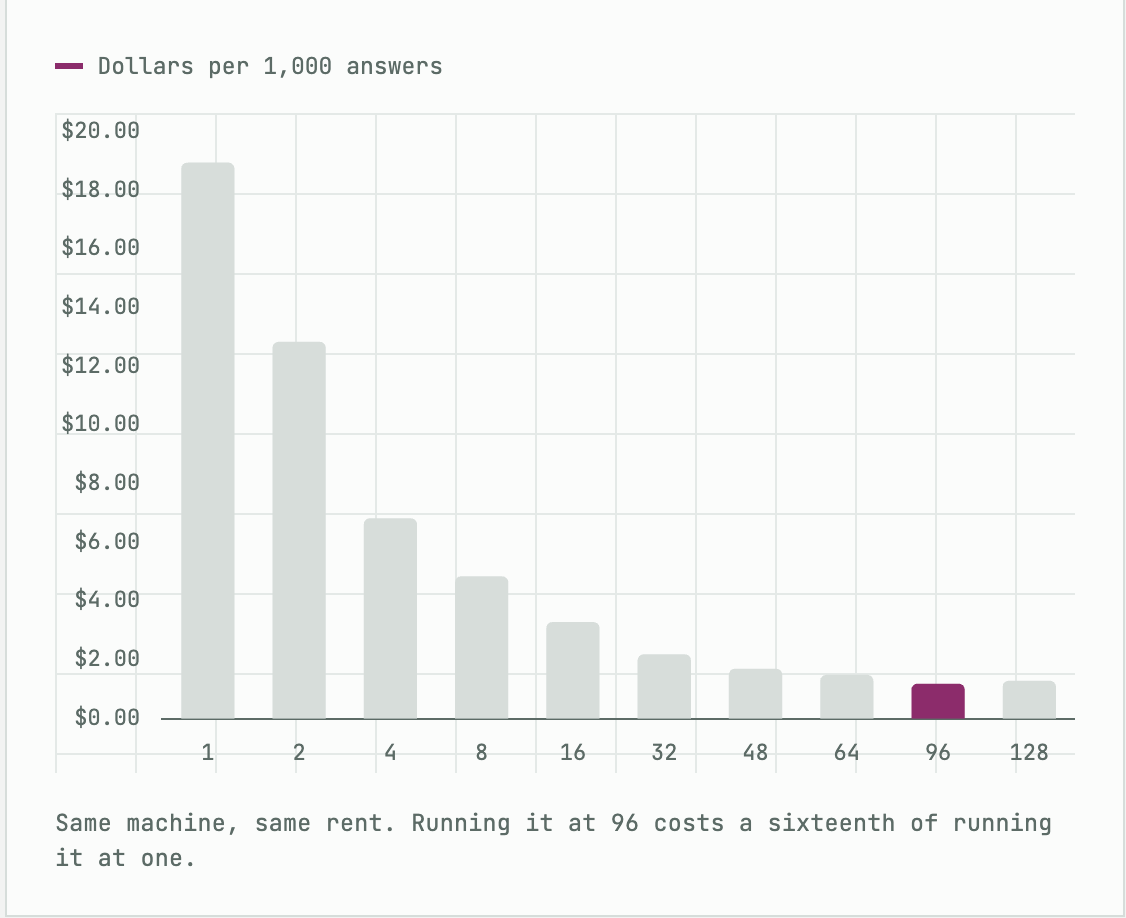
The cheapest point is exactly where throughput peaks, which is not a coincidence. Rent is fixed, so cost per answer is just throughput turned upside down.
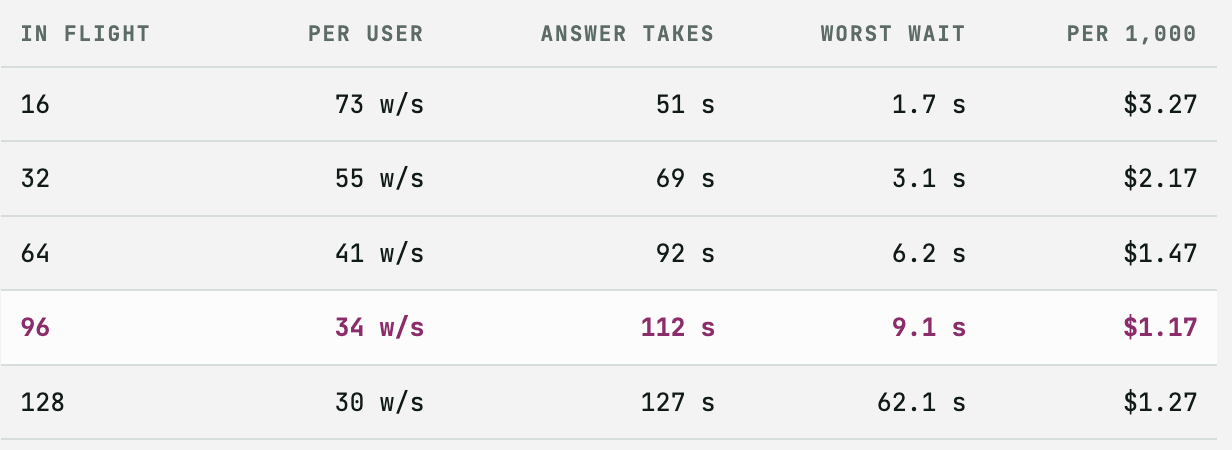
Ninety-six wins on throughput and on money at the same time. One twenty-eight loses on both, plus the waiting.
From requests to people
Ninety-six requests in flight is not 96 people. An answer occupies a slot for 112 seconds, and people spend most of a conversation reading and typing rather than waiting.
If your users send a message every five minutes, each slot serves about three of them, so 96 slots hold around 250 people. If they send one every two minutes, it is closer to 100. That assumption about how often people type is doing more work than any measurement in this article, so it belongs next to the number rather than buried under it.
08 What I would tune next
Every number above is a floor. I ran the model as it came out of the box, and the box has several things left in it.
Build the missing kernel recipe
vLLM printed this while starting up and I nearly missed it:
Using default MoE config. Performance might be sub-optimal!
Config file not found at E=256,N=256,device_name=NVIDIA_A100-SXM4-80GB.json
Nobody has published a tuned recipe for routing 256 experts on this particular card, so the machine is using generic settings. vLLM ships a script that finds better ones by trying them. It costs an hour or two of rent and plausibly returns 10 to 25 percent. This is the largest single item on the list and the easiest to justify, since it would also push the peak past 96.
Stop the tail from exploding
The 62 second worst case at 128 requests came from how the server admits new work. It reads prompts in fixed-size chunks, and with 128 people arriving at once carrying 1,500 words each, that is a lot of reading. Whoever arrives last waits behind all of it.
--max-num-batched-tokens 16384
Bigger chunks, fewer rounds, a flatter distribution of waits. It costs a little throughput. Worth testing if you expect bursts.
Make the shared prefix actually shared
This one surprised me. vLLM can cache the part of a prompt that every user shares, so a common system prompt is read once instead of a hundred times. I turned that on. It never fired. Not once, across every run.
The cause was in the startup log:
Setting attention block size to 1056 tokens to ensure that
attention page size is >= mamba page size
Caching works in blocks, and on this model a block is 1,056 words rather than the usual 16. My shared prompt was 350 words. It never filled a single block, so there was nothing to reuse.
The practical rule: on this architecture, prompt caching does nothing until your shared prefix passes about a thousand words. If you are writing a system prompt for this model, that is a real design constraint. A 400 word prompt gets re-read for every user, forever. A 1,200 word prompt gets read once.
Turn the thinking off, sometimes
The biggest lever is not a flag. It is deciding when the model needs to think.
Roughly nine tenths of the words this model produces are thinking, not answer. For a hard debugging question that is money well spent. For classifying a support ticket it is absurd. If half your traffic can run without the reasoning step, you have roughly halved your bill, which beats every kernel tweak on this list combined.
Two things I would measure differently
I capped answers at 3,072 words so that every run was comparable. Real answers are about 19 percent longer, so real capacity is about 19 percent lower than the raw table suggests.
I also tested single questions. Real conversations grow. Turn ten carries nine turns of history, so it costs more to read than turn one. Anyone planning capacity from this should test a growing conversation, not a fresh one.
09 What I actually learned
I went in thinking the constraint would be memory. That is the reflex with big models: count the gigabytes, divide, done.
Memory was never close. The machine had room for 98 users at full context before I tuned anything, and it never used more than a few percent of it. What stopped me was the expert routing saturating, and underneath that, the sheer volume of words the model produces to answer a small question.
The reasoning is the cost. Not the parameters, not the context window, not the cards.
Which points at the one thing worth doing before any of the tuning above: find out how many of your requests genuinely need the model to think. That answer is worth more than another GPU.
Two cards, $3.18 an hour, about 250 people. An afternoon to find out, and most of that was waiting for weights to load.Ornith-1.5-35B-A3B (35B total, 3B active, 256 experts, top-8)
2 × NVIDIA A100-SXM4-80GB, tensor parallel 2, bfloat16
vLLM 0.27.1, 32K context, prefix caching and chunked prefill on
RunPod secure cloud, US-MD-1, $3.18/hr · August 2026
Answers capped at 3,072 tokens. Realistic runs padded to a 1,500 token prompt.